.png)
-RDLUoJeYQyeCQXaVVJbJLbiiYNElcLJH.png)
使用 DeepSeek 生成完整的3.8妇女节 Web 页面并本地运行
在上一篇文章中,我们利用 DeepSeek 生成了一个 HTML+CSS+JS 页面,向所有女性致敬。本篇文章将进一步优化这个网页,让它可以完整运行,并教你如何在本地打开和运行这个 AI 生成的网页。即使你没有任何编程基础,也能轻松学会!
一、让 AI 生成完整的 Web 页面
💬 示例指令:
“帮我创建一个完整的 3·8 妇女节网页,包括倒计时、女性名人展示、温馨祝福、主题背景,以及自适应布局,适配手机端。”
DeepSeek 生成的代码将包含 HTML(结构)+ CSS(样式)+ JavaScript(交互),让整个页面更加完整和美观。
二、完整代码:3·8 妇女节网页(可本地运行)
<!DOCTYPE html>
<html lang="zh">
<head>
    <meta charset="UTF-8">
    <meta name="viewport" content="width=device-width, initial-scale=1.0">
    <title>3·8 国际妇女节 | 致敬伟大的女性</title>
    <style>
        body {
            font-family: Arial, sans-serif;
            background: linear-gradient(to right, #ff9a9e, #fad0c4);
            text-align: center;
            padding: 20px;
            color: white;
        }
        h1 {
            font-size: 2em;
            margin-bottom: 10px;
        }
        .countdown {
            font-size: 20px;
            margin: 15px 0;
        }
        .section {
            background: rgba(255, 255, 255, 0.2);
            padding: 20px;
            border-radius: 10px;
            margin: 20px auto;
            max-width: 600px;
            box-shadow: 0 0 10px rgba(0, 0, 0, 0.1);
        }
        .btn {
            background-color: #ff69b4;
            color: white;
            padding: 10px 15px;
            border: none;
            border-radius: 5px;
            cursor: pointer;
            margin-top: 10px;
        }
        .btn:hover {
            background-color: #d63384;
        }
        .women-icons img {
            width: 80px;
            height: 80px;
            margin: 10px;
            border-radius: 50%;
            border: 2px solid white;
        }
    </style>
</head>
<body>

    <h1>🌸 3·8 国际妇女节 🌸</h1>
    <div class="countdown" id="countdown">距离妇女节:00天 00小时 00分 00秒</div>

    <div class="section">
        <h2>💖 向伟大的女性致敬</h2>
        <p>妇女节是一个庆祝女性成就和贡献的日子,我们向所有勇敢、智慧、温柔的女性表达敬意!</p>
    </div>

    <div class="section women-icons">
        <h2>🌟 女性名人榜</h2>
        <img src="https://upload.wikimedia.org/wikipedia/commons/c/c8/Marie_Curie_c._1920s.jpg" alt="居里夫人" title="居里夫人">
        <img src="https://upload.wikimedia.org/wikipedia/commons/d/d6/Mother_Teresa_1.jpg" alt="特蕾莎修女" title="特蕾莎修女">
        <img src="https://upload.wikimedia.org/wikipedia/commons/c/cd/Yang_Jiang_in_1962.jpg" alt="杨绛" title="杨绛">
    </div>

    <button class="btn" onclick="showBlessing()">🌷 送上祝福</button>

    <script>
        function showBlessing() {
            alert("愿世界所有女性都被温柔以待,妇女节快乐!🌷");
        }

        function updateCountdown() {
            const eventDate = new Date("March 8, 2025 00:00:00").getTime();
            const now = new Date().getTime();
            const timeLeft = eventDate - now;

            let days = Math.floor(timeLeft / (1000 * 60 * 60 * 24));
            let hours = Math.floor((timeLeft % (1000 * 60 * 60 * 24)) / (1000 * 60 * 60));
            let minutes = Math.floor((timeLeft % (1000 * 60 * 60)) / (1000 * 60));
            let seconds = Math.floor((timeLeft % (1000 * 60)) / 1000);

            document.getElementById("countdown").innerHTML = `距离妇女节:${days}天 ${hours}小时 ${minutes}分 ${seconds}秒`;
        }

        setInterval(updateCountdown, 1000);
    </script>

</body>
</html>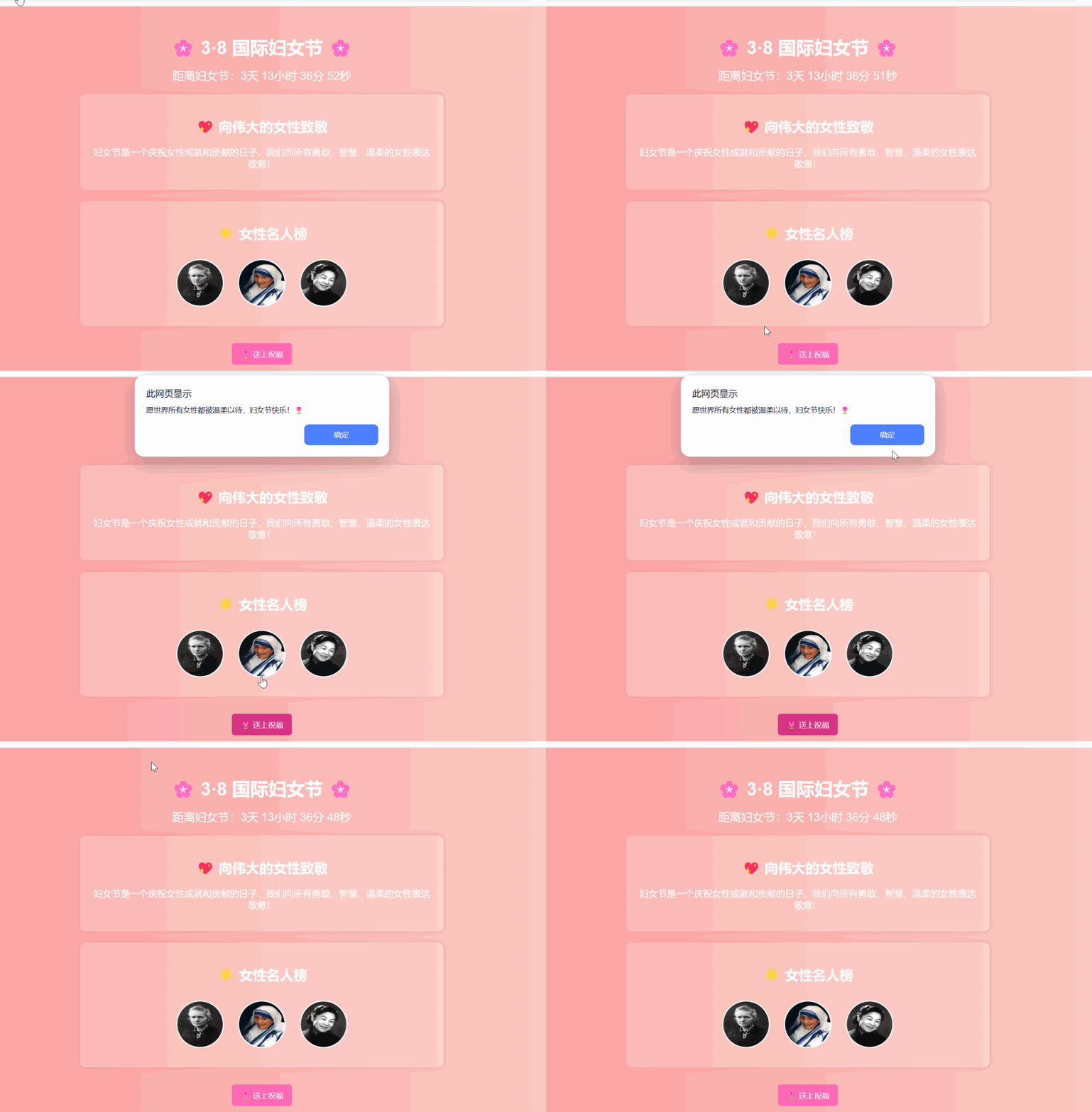
三、如何在本地运行这个网页?
📌 步骤 1:创建 HTML 文件
打开 记事本 或 VS Code,新建文件
index.html复制上方代码,粘贴到文件中
保存文件(确保文件后缀是
.html)
📌 步骤 2:本地运行
在文件夹中找到
index.html双击打开,用 Chrome/Edge/Firefox 浏览器查看网页
📌 步骤 3:优化网页
更换背景颜色
增加更多女性榜样(比如武则天、玛拉拉、撒切尔夫人)
添加音乐播放(播放一首优雅的背景音乐)
四、如何上传到互联网?
如果你想让你的朋友也能看到你的妇女节网页,可以使用以下方法:
✅ GitHub Pages(免费托管)
✅ Vercel / Netlify(一键部署)
✅ 个人服务器(适合有网站的用户)
💡 推荐方法:GitHub Pages
注册 GitHub 账号(https://github.com)
新建一个仓库(Repository)
上传
index.html文件启用 GitHub Pages,就能获得一个免费的访问网址!
💡 总结
本篇文章教你 如何使用 AI 生成一个完整的 Web 页面,并在本地运行。通过这个简单的步骤,你就能打造一个专属的 3·8 妇女节网页,表达对女性的尊敬和祝福。
👉 下一篇文章,我们将继续探索如何让 AI 优化网页样式和交互,让你的页面更美观、更具吸引力!